Sage Intacct Retail EDI: What It Actually Takes to Get From 850 to 810
Retailer orders into Sage Intacct sounds simple until five retailers send five different item numbers for the same product. Here's what we built to handle it.
Sunday night we turned it on.
Ten trading partners, retail and wholesale, all sending purchase orders into Sage Intacct for a multi-warehouse food distributor. Eight more are queued up behind them, rolling out in phases.
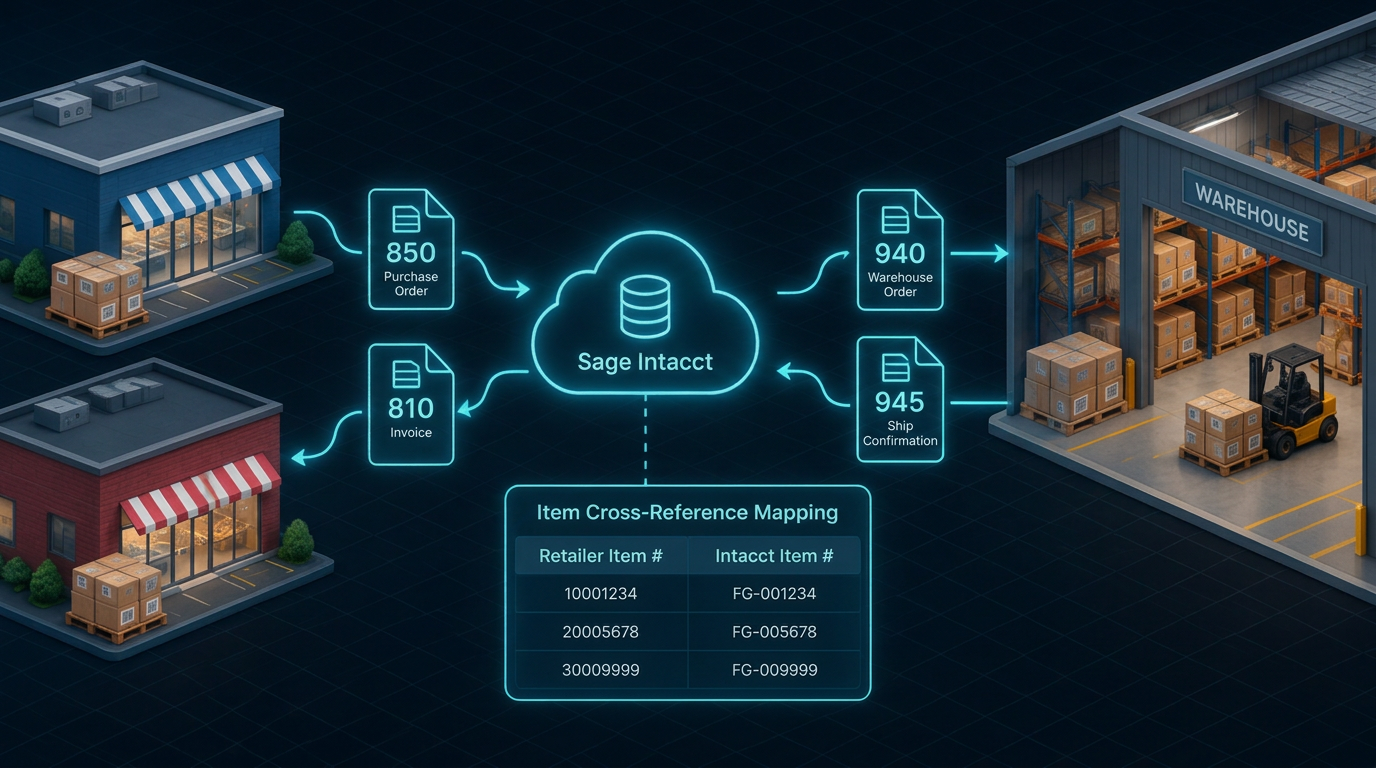
On a slide, it's four boxes and three arrows. 850 in, 940 to the warehouse, 945 back, 810 out. Done.
In real life, the slide is the easy part.
Same product, five "correct" item numbers
Here's what the arrows don't show you.
One retailer sends a GTIN. Another sends a UPC case code. Another sends a 12-digit consumer package code and expects 13 digits back, so you add a leading zero. One wants the last five digits used as the item ID. One needs a trailing digit dropped. Some have their own cross-reference table and nothing else will do.
Every one of them is right. By their spec.
Get it wrong and the order lands on the wrong SKU. The warehouse picks the wrong product. The invoice gets rejected. And nobody calls the integration vendor about it. They call the AR person, who calls the warehouse, who calls you.
During testing, several items mapped to the wrong SKU until we set the rules partner by partner. That's the job.
Sage Intacct is a good ERP. It doesn't know retailer rules.
Nothing in Intacct knows that a retailer's allowance is per unit and has to be multiplied by order quantity. Or that a ship confirmation will come back with what look like duplicate lines when a shipment is split across lots, and that's perfectly normal.
That knowledge has to live somewhere. Usually it lives in someone's head and a spreadsheet. We'd rather it live in the build.
What we built
The layer between Intacct, the retailers and the warehouse:
- 850 Purchase Order. Lands in Intacct as a sales order. Payment terms come from Intacct. Pricing comes from the Intacct price list, so your price list stays the source of truth, while retailer allowances still come from the PO.
- 940 Warehouse Order. Releases the order to a 3PL or your own warehouse, based on how each trading partner is set up. It works for manually entered sales orders too, not only EDI.
- 945 Ship Confirmation. Creates the shipper record in Intacct once the order ships, including shipments split across lots.
- 810 Invoice. Goes back to the retailer from the Intacct invoice, in the format they'll accept, with acknowledgments and rejections captured.
Plus the parts that make it hold up: per-partner item cross-references, allowances posted as a discount line, routing per partner, and handling for partials, backorders, cancellations, over/under shipments and missing references.
The boring stuff that actually breaks it
Want to know one of the most common causes of failed orders during rollout? Missing master data. A customer or ship-to that didn't exist in Intacct yet. Fix the record and the error clears.
That's typical. Most integration failures don't start in the integration code. They start in the systems and data on either end.
So when a shipper can't be created because the lot or quantity doesn't match, it doesn't fail into a log nobody reads. It goes on a daily error report, and the client hears about it from us, not from the retailer.
Who owns it when it's wrong?
That's the question I'd ask any vendor on this kind of project. Not "do you support the 850." Everyone supports the 850.
Ask who notices when a retailer changes a spec. Ask who fixes the SKU mapping before the warehouse picks. Ask whose problem the rejected invoice is.
With APIWORX, it's ours. That's what ops team included means.
If you sell into retail on Sage Intacct
Five things to check before your next trading partner goes live:
- List every identifier each retailer sends for your top 20 items. GTIN, case code, CPC, vendor part number. If they don't all resolve to one Intacct item, you've found your first chargeback.
- Decide where price lives. PO price or Intacct price list. Pick one and write it down.
- Map how each partner ships. 3PL, your own warehouse, or both. Your routing has to know.
- Check your master data. Every customer and ship-to a retailer can send should exist in Intacct before go-live.
- Ask who gets the error at 2 a.m.
If you'd rather not do that alone, get your Sage Intacct EDI blueprint and we'll map your trading partners, warehouses and Intacct setup with you. Or grab the Sage EDI mapping checklist.
Which retailer requirement has cost you the most?
See the APIWORX platform in action
Tell us about your systems and we'll build a tailored automation plan within 24 hours.
Talk to an expert